Web Components
今天想要跟大家聊聊 Web Components 這個新玩具,說是新玩具,其實這個概念已經發展有段時間了,尤其筆者本身是玩 Flash 技術出身的,發現 Web Components 跟 Flex Component 差不多,所以就來分享一些心得。
今天想要跟大家聊聊 Web Components 這個新玩具,說是新玩具,其實這個概念已經發展有段時間了,尤其筆者本身是玩 Flash 技術出身的,發現 Web Components 跟 Flex Component 差不多,所以就來分享一些心得。
簡單來講就是你可以客制化 HTML <tag>:
<my-component></my-component>由 W3C 提出:
The component model for the Web. When used in combination, Web Components enable Web application authors to define widgets with a level of visual richness and interactivity not possible with CSS alone, and ease of composition and reuse not possible with script libraries today.
鉴于许多 Web 框架通过暴露 JavaScript API 来构建用户界面,而构建用户界面实际上就是生成一堆 div 和 spans 标记,Web 组件是原生浏览器的解决方案因此不依赖于一个完整的框架。因此,与现在的一般依赖某个 Javscript 框架的 HTML 组件相比,Web组件希望能减少碎片。
最近新起許多 MDV(Model-driven-view)這類 template 和 data binding 開發方式的框架(backbone、angular、ember),那 Web Components 跟這些框架有什麼不同呢?
基本上就是希望藉由規格標準化,讓 Web application 的開發方式與架構更清晰。
尽管 Web 组件是一项有趣的新技术,但在浏览器们都支持它们(并且大部分用户都开始使用这些浏览器们)之前,其中的大部分功能还派不上用场。解决这个问题的一种方法是使用 polyfills。
很遺憾,目前的瀏覽器普遍都還不支援完整的 Web Components,不過可以使用 Google I/O 2013 中釋出的 Polymer library,讓瀏覽器模擬 Web Components 環境嘗嘗鮮。
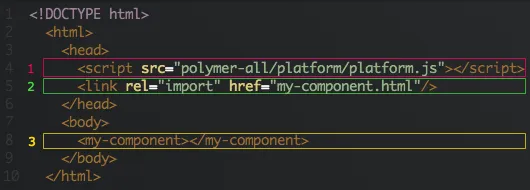
載入 platform.js 讓瀏覽器支援 Web Components 的功能。
使用 <link> 和 import 載入 Web Components:
<link rel="import" href="import-file.html">使用自己建立的元件 <my-component></my-component>,命名方式以 dash(-) 分開為原則:
<element name="my-component">可以加入 constructor 讓 javascript 使用, 例如:
<element name="my-component" constructor="MyComponent">...<script> var myComponent = new MyComponent();</script>也可以繼承其他元件:
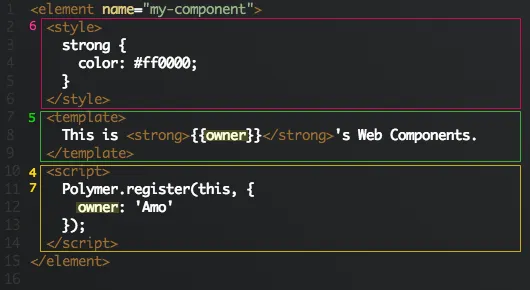
<element name="my-button" extends="button">在 <script> 內加入 Polymer.register(),讓這個元件初始化。
定義元件的 HTML Markup,UI layout。
使用 <style> 定義元件的 CSS 樣式,另外也可以載入外部樣式:
<element name="my-component"> <link rel="stylesheet" href="my-component.css"> <template> …使用 {{}} 將 data binding 到 template,然後在初始化的時候定義變數,例如替這個元件建立一個公用的 title 屬性:
<element name="my-component" constructor="MyComponent"> <template> <h1>{{title}}</h1> </template> <script> Polymer.register(this, { title: "Web Components" }); </script></element>定義完後,就可以使用:
<my-component title="Hello World!"></my-component>or
<script> var myComponent = new MyComponent(); myComponent.title = "Hello World!";</script>Web Component 将会横扫 Backbone、Ember、Angular、Knockout 等等这些框架。但是,接下来这几年,我们还是要用它们,因为很多 Web Component 的 API 只能在 Chrome 的 Canary 开发版本和Firefox的开发版本中使用。
雖然引言中講的很聳動,但目前玩下來還是碰到不少問題。例如我想使用一些第三方的 jQuery Plugin 會無法動作等…,不過因為開發架構很接近 Flash,小弟認為應該會是未來 HTML5 RIA 的開發趨勢,所以目前還是會持續關注。
以上是初步試玩 Polymer Web Components 的一些心得,更多的 feature 可以到 W3C 和 Polymer 網站看看,如果有錯誤的地方也歡迎糾正,祝大家有個愉快的開發旅途 :-)