如何正確處理 AWS API Gateway 的 Lambda Error Status
翻譯自原文 Error handling in AWS API Gateway with Lambda
翻譯自原文 Error handling in AWS API Gateway with Lambda
這篇文章會介紹如何設置 AWS API Gateway 正確處理 Lambda 返回的 HTTP 錯誤狀態碼。
本文假設讀者已經知道如何利用 AWS API Gateway 和 Lambda 建立 REST API,詳細可參考 Create API Gateway API for Lambda Functions。
假設你的 Lambda function 錯誤處理如下:
console.log('I am a AWS Lambda function');exports.handler = function(event, context) { // 一般使用 context.fail 來返回 Lambda function 錯誤 context.fail(JSON.stringify({status:'fail', reason:'some reason', foo:'bar'}));};但是 API Gateway 返回的結果會是 HTTP 200:
HTTP/1.1 200 OK...{ "errorMessage": "{\"status\":\"fail\",\"reason\":\"some reason\",\"foo\":\"bar\"}"}我們希望的結果是:
- HTTP Status 400 Bad request
- 只顯示 errorMessage 的 JSON 值
- 前往 API Gateway Console
- 進入 Method Execution
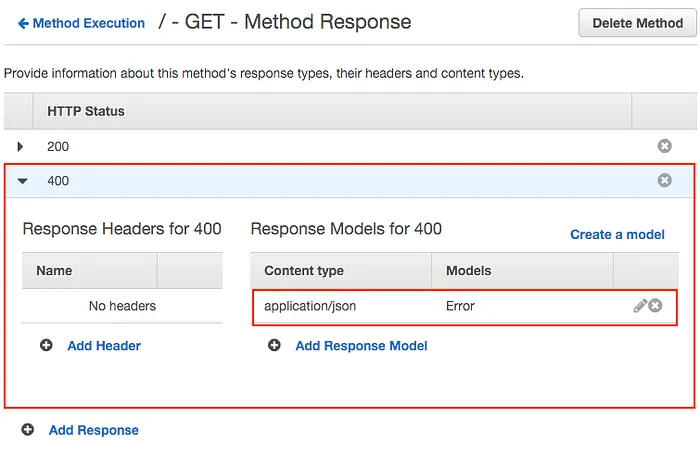
- 進入 Method Response
- 點選 Add Response
- 輸入 HTTP Status 400
- 點選 Add Response Model
- 輸入 Content type application/json、Models Error
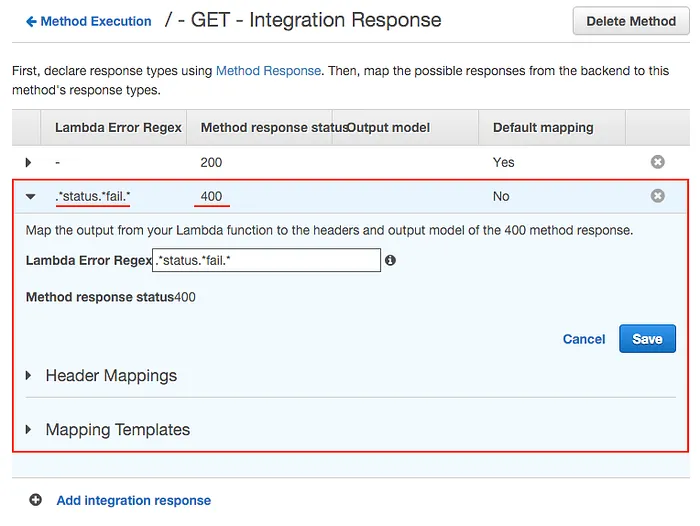
- 進入 Integration Response
- 點選 Add integration response
- 輸入 Lambda Error Regex
.*status.*fail.*、Method response status 400
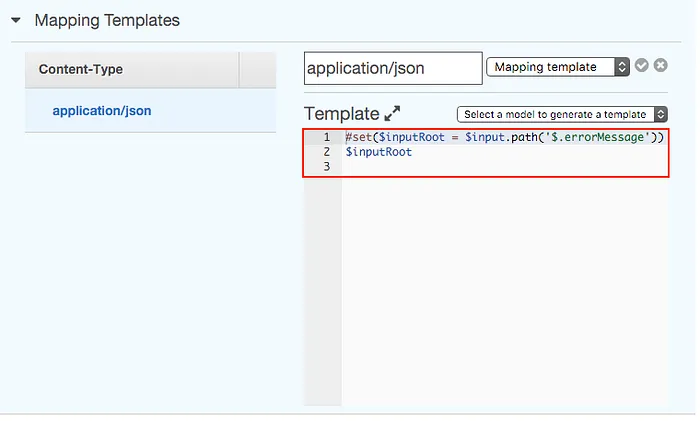
- 展開 Mapping Templates
- 點選 Add mapping template
- 輸入 Content-Type application/json
- 點選 Output passthrough 並改成 Mapping Templates
- 輸入以下程式碼:
記得點選 Deploy API 完成 API 的更新,然後測試返回結果是否為 HTTP 400。
HTTP/1.1 400 Bad Request...{ "foo": "bar", "reason": "some reason", "status": "fail"}