Amazon S3 正確處理 HTML5 History 路由問題
如果你是使用 Angular、React 或是 Vue 來開發 SPA(單頁面應用),並且放在 Amazon S3 Static Website Hosting 上的話,那麼你會碰到 URL routing 的問題。
如果你是使用 Angular、React 或是 Vue 來開發 SPA(單頁面應用),並且放在 Amazon S3 Static Website Hosting 上的話,那麼你會碰到 URL routing 的問題。
一般 react-router 或 vue-router 都預設使用 hash 的方式來處理 SPA 的路由:
http://domain.com/#!/paths如果你不喜歡 #!/ 的顯示方式,可以使用 HTML5 的 History API,這樣就能像一般網站那樣顯示 URL:
http://domain.com/paths但是使用 HTML5 History API 時,通常必須搭配 server 端正確的 路由配置 才能防止出現 404 Not Found 的情形。
遺憾的是,在 Amazon S3 Static Website Hosting 上,你無法更動 Apache 或 Nginx 的配置,所以需要靠其它方式來解決問題。
- 使用 S3 的 Redirection Rules
- 使用 CloudFront 的 Custom Error Response
Amazon S3 Static Website Hosting 提供了 Edit Redirection Rules 的選項,我們可以輕鬆使用這段程式碼將所有 domain.com/#!/paths 所產生的 404,全部重新導向至根路徑:
<RoutingRules> <RoutingRule> <Condition> <HttpErrorCodeReturnedEquals>404</HttpErrorCodeReturnedEquals> </Condition> <Redirect> <HostName>你的網域(例:domain.com)</HostName> <ReplaceKeyPrefixWith>#!/</ReplaceKeyPrefixWith> </Redirect> </RoutingRule></RoutingRules>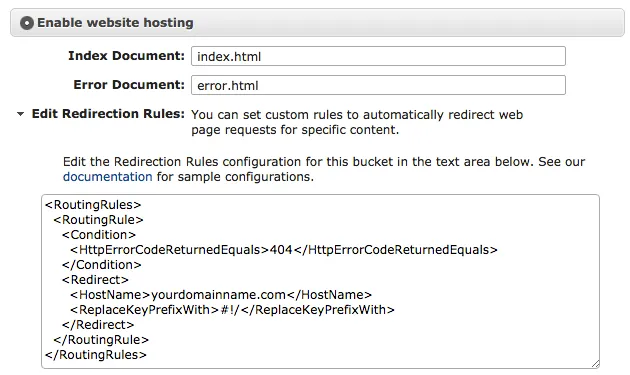
然後在你的 app 開始處,加入這段 JavaScript 來將 /#!/paths rewrite 成 /paths:
<!-- index.html --><script> history.pushState({}, "index.html", location.hash.substring(2));</script>History API 在各個瀏覽器上的使用方式都不盡相同,這裡我們就省略了判斷的程式碼。
如果你有使用 Amazon CloudFront 來幫 S3 Static Website Hosting 加入 CDN 的話,那解決方式就更簡單了:
- 前往你的 CloudFront Distribution
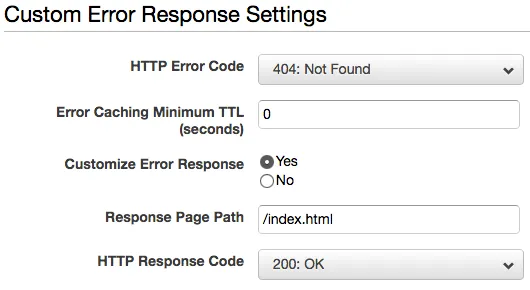
- 選擇 Error Pages 標籤,點選 Create Custom Error Response 建立自訂的錯誤回應
- HTTP Error Code 選擇 404: Not Found
- Error Caching Minimum TTL 輸入 0
- Customize Error Response 選擇 Yes
- Response Page Path 輸入 /index.html
- HTTP Response Code 選擇 200: OK
- 點選 Create 完成